The Real Cost of the “Too Many Hats” Problem
Walk into a lean small or medium sized marketing team today and you’ll see the same thing: one or two people trying to do everything. A marketing manager at a mid-sized company often wears five hats. On any given Tuesday, they are the copywriter, the social media manager, the webmaster, and—theoretically—the SEO specialist.
The problem is that the “MarTech” stack is exploding again. According to MarTech Day’s 2024 State of the Stack report, the average SMB now maintains 152 different SaaS apps. Instead of simplifying life, this “tool sprawl” has created a new bottleneck: you spend more time managing tools than marketing your business.
- 15 Hours: The amount of time SMB marketers reclaim per week when they successfully automate repetitive tasks. (Forbes).
- 4–8 Hours: The time wasted per month on manual SEO reporting for a single property. (AgencyAnalytics).
- 70%: The number of teams who say “tool sprawl” is now the primary barrier to actually using AI effectively. (Zapier).
The bottleneck isn’t information access. It is the time required to log into 152 different dashboards to find a single answer.
From “Tool Sprawl” to AI Orchestration
The Model Context Protocol (MCP) is the industry’s answer to this mess. It is an open standard that lets AI assistants (Claude, ChatGPT, Cursor, and any other compatible client) talk to external systems in a uniform way. Instead of each tool requiring its own integration, MCP creates a shared handshake. One protocol, many tools.
For developers, that solves an integration problem. For marketing teams, it solves something more useful: a workflow problem. The team no longer needs to learn each tool’s query language or hire a specialist for every platform. They learn one interface (their AI assistant) and the MCP routes the conversation to whichever underlying system has the answer.
The shift for the Business+ team
| The Manual Era (Old Way) | The MCP Era (New Way) |
| Managing 150+ disconnected tools | One interface that orchestrates your entire SEO stack |
| 8 hours wasted on manual SEO reports | Data assembly happens in real-time conversation |
| Work doesn’t get done due to lack of specialists | Your assistant acts as a fractional expert for your tools |
| Every SEO report is a weekend project | Answers arrive in seconds, not days |
| Constant context-switching between tool tabs | All your data stays inside one conversation |
Orchestration vs. Access
But for a lean team, “access” isn’t enough. You don’t need another connection; you need an Orchestration Layer. This is where the WordLift MCP changes the game. While the protocol is the “language,” WordLift is the “Expert Analyst” that uses that language to talk to your proprietary Knowledge Graph.
Instead of hiring a $100k/year specialist to tell you why your rankings dropped, you use the WordLift MCP as your fractional expert. It doesn’t just “show you data”; it orchestrates the answers across your entire SEO stack. This solves the “Orchestration Gap” that Zapier identifies as the leading cause of AI failure in small businesses.
If the Content Pipeline builds the infrastructure, the WordLift MCP turns the day-to-day operation of that engine into something any marketer can handle. It gives lean teams back the 15 hours a week that manual dashboards stripped out.
Inside the WordLift MCP: Your Fractional SEO Agency
The WordLift MCP exposes four tools to your AI assistant. All four operate against the same Knowledge Graph that your content pipeline builds. This is what makes the answers “grounded” in your actual business data, rather than AI “hallucinations.”
YOUR DAILY ASSISTANT: `wordlift_agent`
- What it does: Your natural-language interface. Ask it to analyze entities, audit your schema, or triage a rankings drop.
- The SMB Value: This acts as your “Virtual Technical SEO.” It does the thinking so you can do the doing.
QUICK DATA LOOKUP: `wordlift_graphql_query`
- What it does: Pulls precise numbers and lists from your Knowledge Graph.
- The SMB Value: No more digging through menus. Ask for a list of your top-performing pages and get it in seconds.
CONTENT DISCOVERY: `wordlift_neural_search`
- What it does: Searches your site conceptually. Find related content you forgot you wrote.
- The SMB Value: Perfect for finding internal link opportunities or repurposing old blog posts without manual searching.
ACCOUNT SWITCHER: `switch_credentials`
- What it does: Swap API keys if you manage more than one site.
- The SMB Value: Essential for boutique agencies or business owners with multiple properties.
Five Workflows Powered by MCP for Marketing Teams
Here is how a lpan>ean team saves 10+ hourpan>s a week usingan> the MCP.
1. RANKINGS DROP TRIAGE (WITHOUT THE PANIC)
The Old Way: Traffic dips. You spend hours in GSC trying to figure out what happened, usually ending in a “best guess.”
With the MCP: The agent identifies exactly which pages dropped, separates seasonal trends from actual losses, and gives you a fix-it list.
Prompt: > Run a rankings drop audit. Our traffic dropped around [date]. Tell me what happened and what to fix first.
2. NEWSLETTER IDEAS IN 60 SECONDS
The Old Way: Staring at a blank screen on “Newsletter Thursday,” trying to remember what content you have.
With the MCP: The MCP finds your most “under-leveraged” content (high impressions, low clicks) and writes the subject lines for you.
Prompt: > Look at my content from the last 30 days and suggest 3 newsletter topics that our audience is searching for but hasn’t clicked on yet.
3. ENTITY GAP ANALYSIS (PUNCH ABOVE YOUR WEIGHT)
The Old Way: Trying to manually compare your blog post to a big competitor. You miss the subtle “entities” they are using.
With the MCP: The agent compares your URL to the top rankings and tells you exactly which concepts are missing. You get enterprise-level depth in 30 seconds.
Prompt: > Compare ‘[your URL]’ to the top 3 results for ‘’. What topics did I miss?
4. FINDING INTERNAL LINKS AUTOMATICALLY
The Old Way: Writing a new post and trying to remember which 5 old posts you should link to.
With the MCP: The agent scans your archive and gives you the exact URLs and anchor text to use.
Prompt: > I just wrote a post about [topic]. Find 5 existing pages on my site that I should link to and suggest the anchor text.
5. E-E-A-T MARKUP WITHOUT A DEVELOPER
The Old Way: Waiting weeks for a developer to add “Author Schema” to your site.
With the MCP: The MCP generates the code for you and, if configured, can push it live. You own your SEO from start to finish.
Prompt: > Create the Author Schema for [Name] and ensure it links to their LinkedIn and bio page.
The Impact of MCP for Marketing Teams on Execution
When a lean team stops “clicking through dashboards” and starts “asking an assistant,” the business changes:
- The “Specialist” barrier vanishes: You don’t need to hire a team of four to get the results of a team of four.
- Generalists become power players: A marketing assistant can now produce advanced analytical reports that used to require a senior SEO.
- Decisions happen in real-time: You get your answers during the meeting, not “next week after I run the report.”
Governance: Keeping it Simple
You don’t need a complex legal framework. Just follow three rules:
- Scope your keys: One API key per site.
- Human-in-the-loop: Always read what the AI generates before you post it or push it live.
- Save your best prompts: Keep a “cheat sheet” of prompts that work well for your specific business.
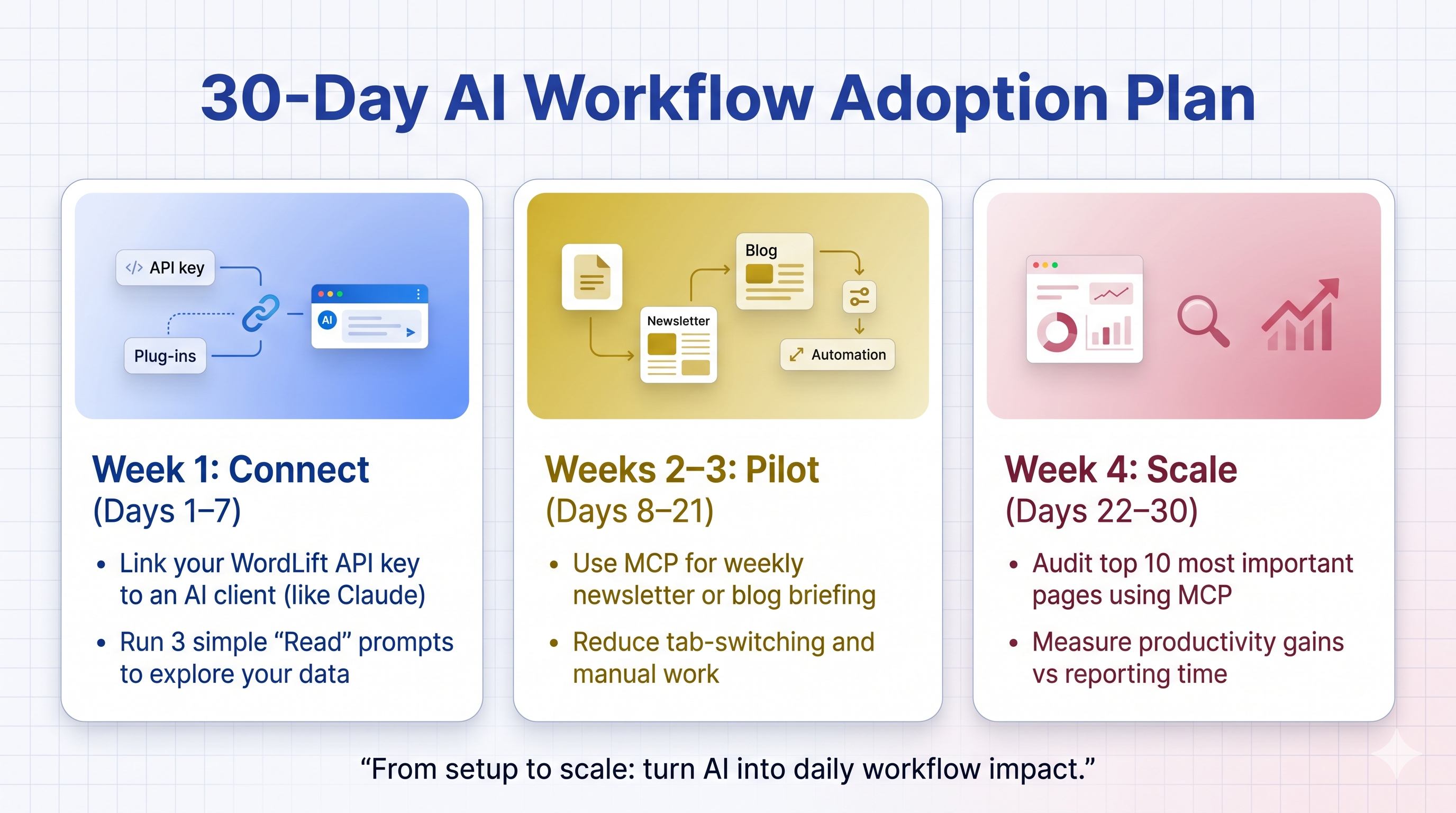
A 30-Day Success Plan for Lean Teams