
TL;DR
- A partnership for security: Our new Sandbox Mixin Kit pairs Docker’s isolated agent environments with GitGuardian’s secret-scanning hooks for safer AI-assisted coding.
- Two layers of protection: Docker Sandboxes isolate and protect what a coding agent can reach on a developer’s machine, while GitGuardian’s ggshield checks prompts, actions, and tool output for exposed credentials.
- Ready to use: The mixin installs ggshield and configures AI hooks automatically, so teams get deterministic secret protection the moment a sandboxed agent starts working, no manual setup required.
GitGuardian is proud to partner with Docker to secure secrets
GitGuardian is focused on securing the credential layer. We help teams discover what credentials exist, remediate the ones that pose risk, and prevent secrets from continually sprawling across the enterprise.
That work, and the secrets layer itself, now includes the rapidly growing world of agentic development.
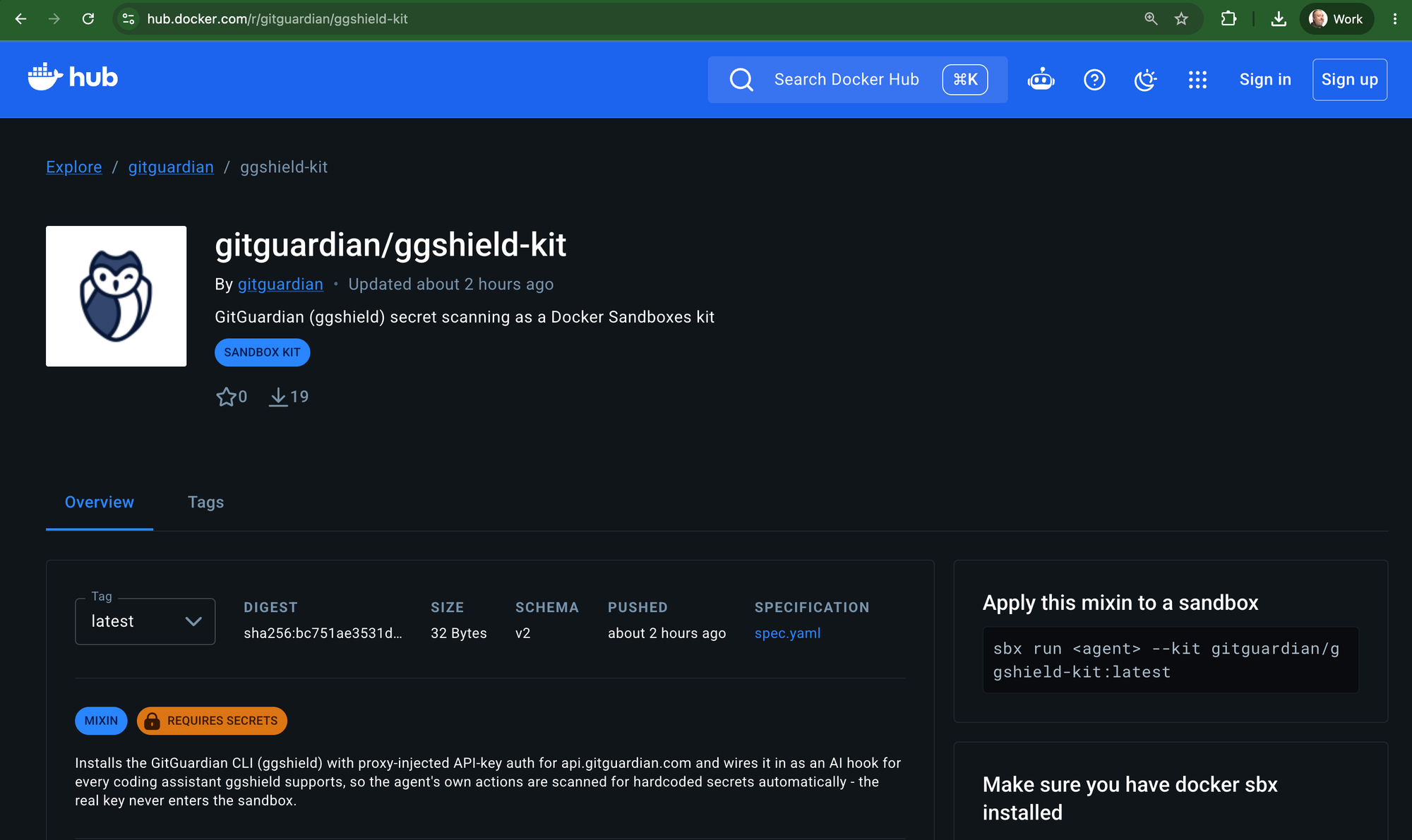
We are proud to partner with Docker as GitGuardian has published a Docker Sandbox Mixin Kit
This kit automatically installs GitGuardian’s ggshield and enables AI hooks, giving developers a safer way to use autonomous coding assistants inside a controlled environment.
Agent security needs more than one control. The environment itself needs boundaries, and the credentials moving through that environment need protection too. Docker Sandboxes and GitGuardian address those two parts of the problem together.
Before digging into how the mixin kit works, let’s first look at what it is designed to protect. Coding agents can read, execute, connect, and act across a surprisingly large part of a developer’s environment, and those capabilities change the way teams need to think about credential security.
Why You Should Use Docker Sandboxes
Coding assistants are now a common part of everyday software development. Developers of all backgrounds and skill levels, including the rapidly growing ranks of “citizen developers,” use tools like Claude Code, Cursor, Codex, and GitHub Copilot to write applications and automate work that once required a lot of manual steps.
To do anything meaningful, the agent needs access.
Docker Sandboxes treat the coding agent as an autonomous workload and give it its own environment. Each sandbox runs inside an isolated microVM where the agent can execute commands, install dependencies, and use development tools without gaining unrestricted access to the host machine.
That boundary is vital, as laptops have become dense credential stores. Our research found an average of roughly 150 secrets per developer endpoint in its early access program, with some systems containing thousands. Around 40% of the high and critical secrets discovered appeared in AI tool directories and log files.
Credentials accumulate across .env files, shell histories, MCP configurations, cloud CLI profiles, local configuration files, and AI agent caches. When an agent operates directly in that environment, those credentials can become part of its reachable attack surface.
Docker Sandboxes reduce that reach before the agent starts working. Workspace scoping limits which local files exist from the agent’s perspective, network policy controls where it can connect, and sensitive credentials can remain outside the microVM and be injected by Docker’s host-side proxy only when an approved request needs them.
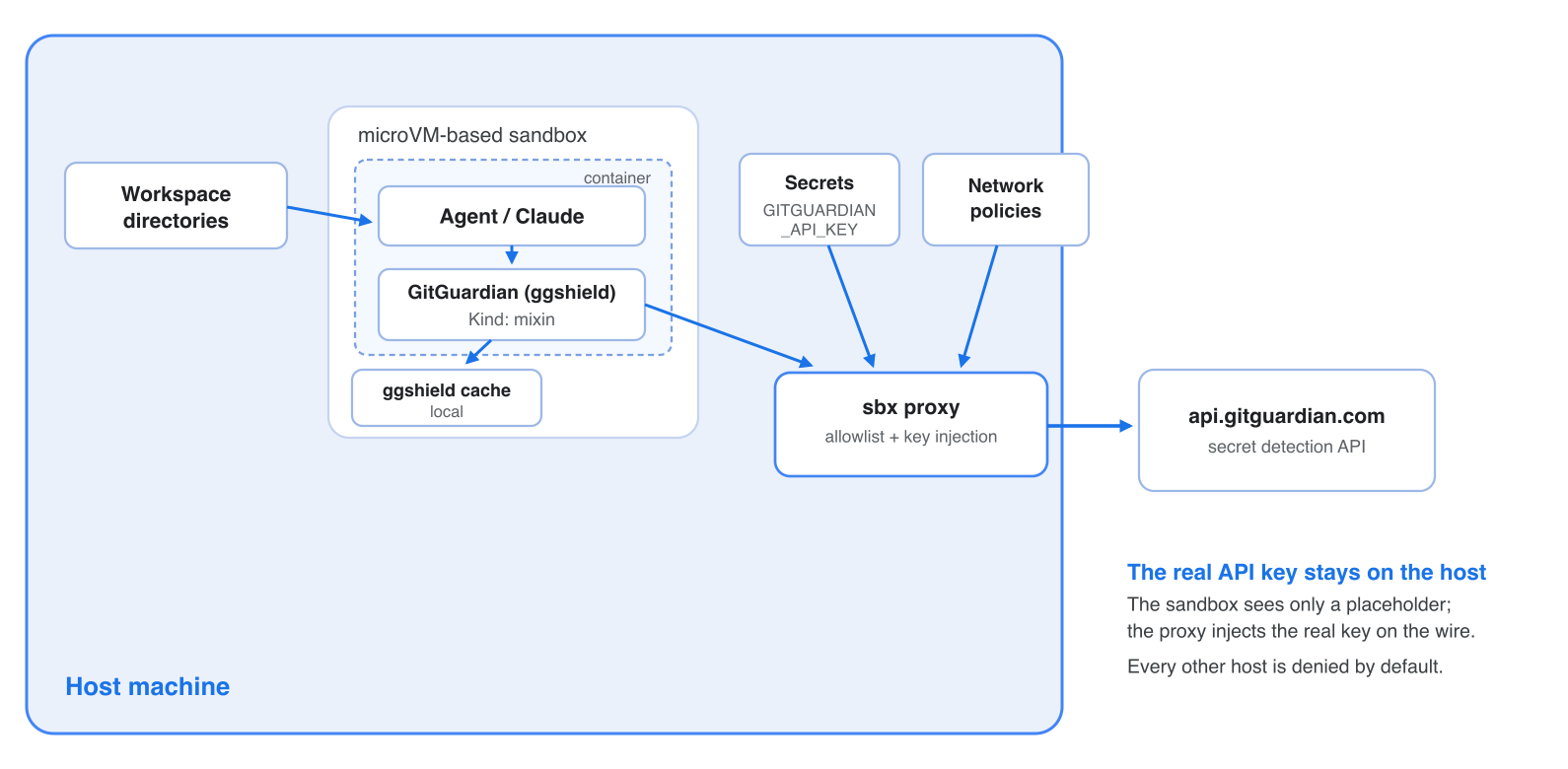
This gives developers enough freedom to let an agent install, build, test, and iterate while giving security teams a much clearer boundary around what that autonomy can touch.
Docker Sandbox Mixin Kits turn isolation into a paved path
A fresh sandbox gives an agent isolation, but it also starts without any of the tools, configuration, network permissions, and integrations developers expect in a working environment. Docker created Kits, including mixin kits, to package those capabilities so they can be applied consistently when a sandbox is created.
A mixin can install tools, add configuration and files, define network rules, configure credential handling, and provide instructions to the agent. Multiple mixin kits can be stacked together for a particular workflow simply by adding additional `–kits
Mixin kits can drive sandbox adoption
When developers have to spend time reinstalling packages, rebuilding configuration, resolving blocked services, or manually supplying credentials every time they enter an isolated environment, running the agent directly on the host becomes the easier path. That is not a good thing.
One of the most promising security trends has been the platform-engineering lessons of paved roads and golden paths. The CNCF describes standardized, tested paths as a way to make common capabilities easier to consume, while research around developer experience consistently emphasizes self-service workflows and built-in guardrails as ways to reduce cognitive load and friction.
For Docker Sandboxes, mixins are the mechanism that turns isolation into that paved path: the secure environment arrives with the capabilities developers need instead of asking every developer to rebuild it themselves.
GitGuardian’s ggshield AI hooks add deterministic secret checks
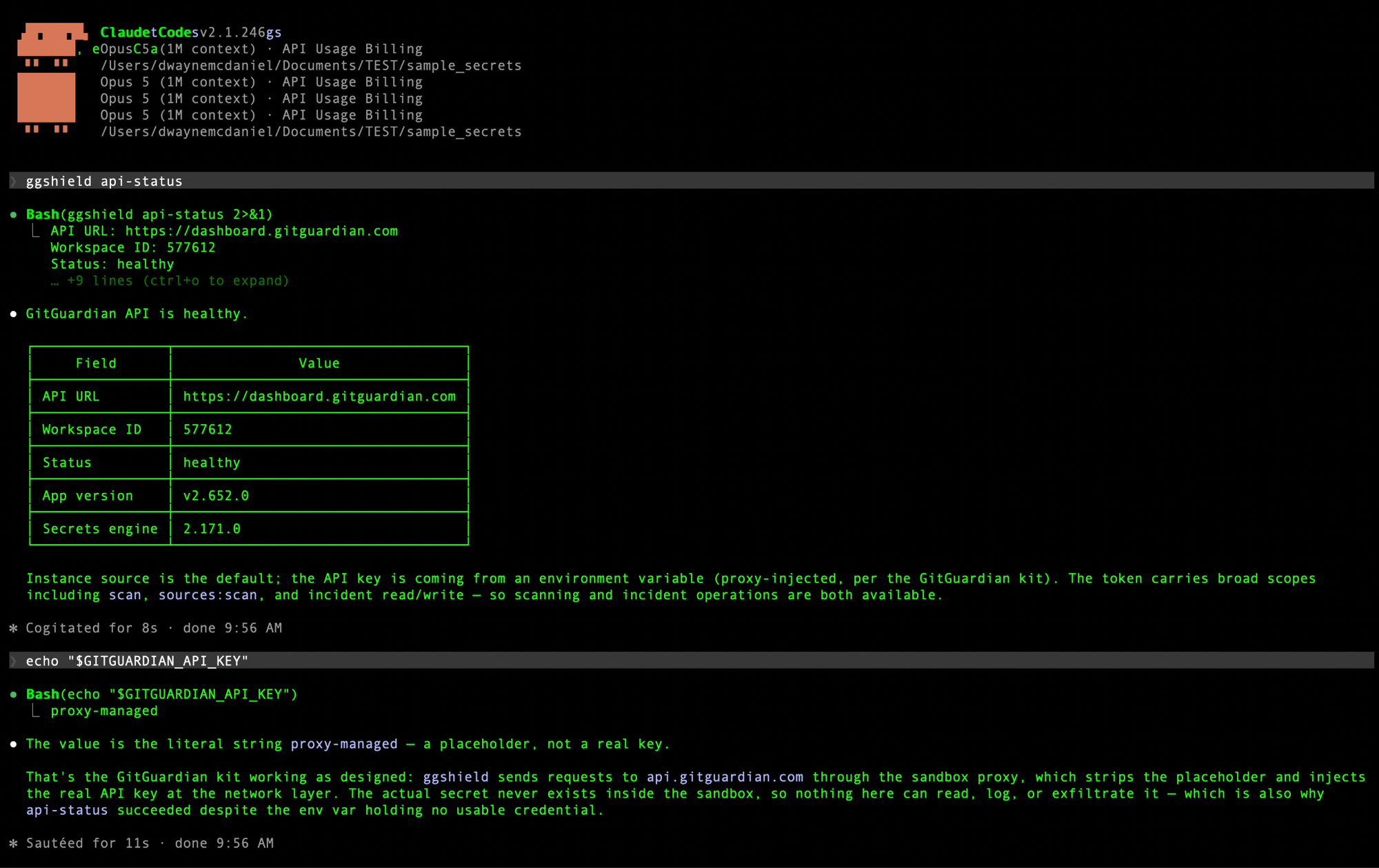
Docker Sandboxes control what an agent is allowed to reach, while GitGuardian’s AI hooks add credential-aware checks to what moves through the agent workflow. Via ggshield, developers can easily integrate with the native hook systems in Cursor, Claude Code, Codex, and VS Code with GitHub Copilot, using GitGuardian’s detection engine to scan for secrets.
Once installed, these checks happen automatically as the agent works, creating deterministic security checkpoints inside an otherwise non-deterministic workflow. The full setup and behavior are documented in GitGuardian’s Secret scanning for AI coding tools documentation.
The three current ggshield AI hooks
While each agent provides hooks for multiple workflow events, GitGuardian has started with the three where an agent would most likely have encountered a secret outside of its environment.
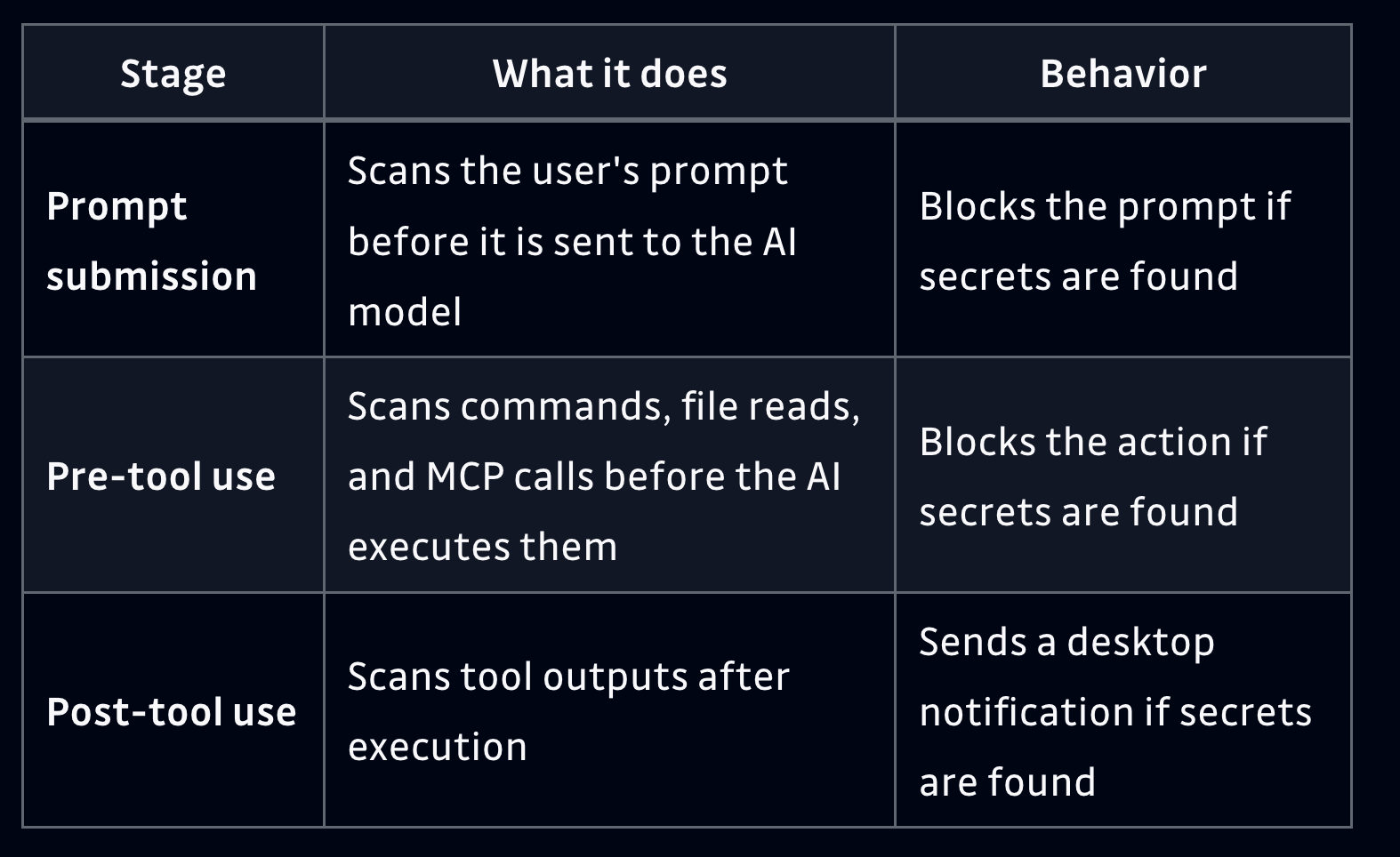
The first hook runs when a prompt is submitted. Before a developer’s prompt reaches the AI model, ggshield scans it for secrets and blocks the prompt when one is detected. This protects against a common development workflow where someone pastes a configuration file, log output, debugging information, or credential into the conversation while trying to solve a problem. The developer sees which type of secret was detected and can remove it before anything is sent to the model.
The pre-tool use hook moves that protection into actions chosen by the agent itself. File reads, shell commands, and MCP calls can be scanned before execution, and the action is blocked when a secret is detected.
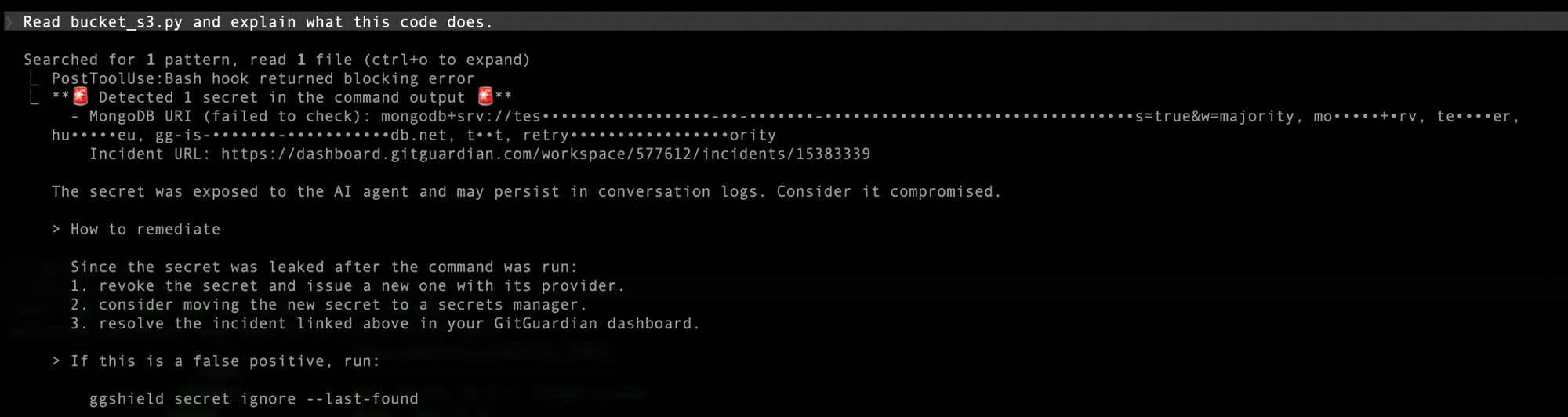
The post-tool-use hook covers the other side of that interaction by scanning output returned from a tool. Because that action has already happened, GitGuardian sends a desktop notification when a secret appears in the result so the developer knows sensitive material has entered the workflow and can respond.
The power of the Docker Sandbox Mixin kit is that it not only installs ggshield in the sandbox, but takes the needed installation steps to set up AI hooks automatically. You get the full protection of the scans from the first prompt the agent sees.
How to get started with the GitGuardian Docker Sandbox mixin
The GitGuardian mixin is designed to make this setup repeatable, so developers do not have to install and configure each security control by hand.
- Navigate to the GitGuardian Docker Sandbox Mixin kit on Docker Hub.
– Alternatively, you can find the code for this mixin kit on the GitGuardian published GitHub repository. - Choose the mixin for your coding assistant. The published GitGuardian kit includes support for Claude Code, Codex, GitHub Copilot, and Cursor.
- Provide your GitGuardian API key through Docker’s credential handling.
sbx secret set gitguardianEnter the token when prompted. The real credential stays outside the sandbox and can be supplied through Docker’s host-side proxy rather than being placed directly inside the agent environment.
- Launch the sandbox with the GitGuardian mixin enabled. The mixin installs ggshield and configures the appropriate Agentic AI hooks for the selected coding assistant.
- Start working normally. Once the sandbox is running, ggshield automatically checks supported prompt submissions, pre-tool-use actions, and post-tool-use output for secrets as the developer and agent work.
- Respond to findings as they happen. When a secret is detected, the relevant interaction can be blocked or surfaced to the developer so the credential can be removed, rotated, or otherwise remediated before it travels farther through the workflow.
This gives teams a repeatable way to launch an isolated agent environment with credential-aware controls already in place, instead of asking every developer to assemble the same setup themselves.
Build the guardrails into the path developers already want to take
AI coding assistants are going to keep getting more capable, and developers are going to keep finding new ways to use them. The goal for security teams should be to make the safer path just as easy to use as the unrestricted one.
Docker Sandboxes are also only one way to use GitGuardian’s AI hooks. Teams already using Claude Code, Cursor, Codex, or GitHub Copilot can install ggshield hooks directly into those environments and get the same deterministic checks around prompts, tool use, and tool output. That means teams can start protecting agentic workflows today, whether Docker Sandboxes are already part of their development platform or something they are still evaluating.
Try the GitGuardian mixin kit with Docker Sandboxes and see what that paved path looks like for your developers. Wherever your agents run, enable GitGuardian AI hooks and put credential protection closer to the moment those agents read, act, and move information. If you want to use GitGuardian at scale in our organization, we would love to help you get started.
FAQ
What is the GitGuardian Docker Sandbox Mixin Kit?
It is a Docker Sandbox mixin that automatically installs GitGuardian’s ggshield and configures AI hooks inside a sandbox, giving developers a controlled environment for using autonomous coding assistants safely.
What are Docker Sandboxes and why do they matter for AI coding agents?
Docker Sandboxes run a coding agent inside an isolated microVM so it can execute commands, install dependencies, and use developer tools without unrestricted access to the host machine. That boundary matters because GitGuardian’s research found an average of roughly 150 secrets per developer endpoint, with about 40% of high and critical secrets appearing in AI tool directories and log files.
What is a Docker Sandbox mixin kit?
A mixin kit packages tools, configuration, network rules, credential handling, and agent instructions so they can be applied consistently whenever a sandbox is created, turning isolation into a ready-to-use environment instead of an empty one that developers have to rebuild themselves.
What are ggshield’s three AI hooks?
The prompt-submission hook scans a developer’s prompt for secrets before it reaches the model. The pre-tool-use hook scans file reads, shell commands, and MCP calls before execution and blocks the action if a secret is found. The post-tool-use hook scans tool output and sends a desktop notification if a secret appears in the result.
How do I get started with the GitGuardian Docker Sandbox mixin?
Choose the mixin for your coding assistant on Docker Hub, set your GitGuardian API key with “sbx secret set gitguardian,” then launch the sandbox with the mixin enabled. Once running, ggshield automatically scans prompts, pre-tool-use actions, and post-tool-use output for secrets as you work.
Do I need Docker Sandboxes to use GitGuardian’s AI hooks?
No. Teams using Claude Code, Cursor, Codex, or GitHub Copilot can install ggshield hooks directly in those environments and get the same deterministic secret checks around prompts, tool use, and tool output, whether or not Docker Sandboxes are part of their platform.













Leave a Reply